R Best Practices

Mariana Montes

Outline

  • Reproducibility & debugging

  • Style

  • Data wrangling

  • I/O

Let’s start with a bad example!

setwd("C:\\Users\\username\\My Projects\\R for best practices")

df<-read.csv( "Flight Subset 2013.csv")
df$month_name = month.name[df$month]
df$carrier <- as.factor(df$carrier)
df$tailnum <- as.factor(df$tailnum)
df$origin <- as.factor(df$origin)
for(i in 1:length(df$dep_delay)){
if(is.na(df$dep_delay[[i]])){
df[i, "dep_delay_cat"] <- NA
}else if(df$dep_delay[[i]] < -30){
    df[i, "dep_delay_cat"] <- "Early"
       }else if(df$dep_delay[[i]] < 30){
    df[i, "dep_delay_cat"] <- "Kind of on time"
  } else {
    df[i, "dep_delay_cat"] <- "Late"
  }
}
df$dep_delay_cat <- as.factor(df$dep_delay_cat)
1
Naming conventions
2
Assignment operator
3
Rewriting the same variable, and with the same operation!
4
1:length(x) (and spaces)
5
for loop to create a categorical variable (and spaces)
6
Again 3!

Reproducibility & debugging

  • {here}: project-oriented workflow
  • git
  • {renv}: virtual environments
  • {reprex}: Minimal reproducible examples
  • browser() and breakpoints

setwd()

  • “/” or “\\” depending on the OS!

The (absolute) path needs to be updated WHEN you:

  • move your script around

  • work from a different device, a server…

  • share your script with someone else

Project-based workflow

  • R projects, git repositories…

  • Portable: relevant code and data together

  • Paths relative to the root of a project

{here}

library(here)

i_am("index.qmd")
# here()
here() |> dir() |> length() |> print()
[1] 6
here("analysis") |> dir() |> print()  
[1] "model.R"
source(here("analysis", "model.R"))   
[1] "These are the contents of model.R"

A cartoon showing two paths side-by-side. On the left is a scary spooky forest, with spiderwebs and gnarled trees, with file paths written on the branches like “~/mmm/nope.csv” and “setwd(“/haha/good/luck/”), with a scared looking cute fuzzy monster running out of it. On the right is a bright, colorful path with flowers, rainbow and sunshine, with signs saying “here!” and “it’s all right here!” A monster facing away from us in a backpack and walking stick is looking toward the right path. Stylized text reads “here: find your path.”

Illustration by Allison Horst.

git

  • R projects can be git repositories

  • Version control: keep track of the changes in your code, data, output…

  • Share and collaborate via GitLab, Github…

{renv}

  • Can be good practice, but it’s not as necessary as with Python
  • Keeps track of R and package versions
library(renv)
init()
install.packages("tidyverse")
install.packages("reprex")
snapshot()
# Someone else uses your project
restore()
1
Initialize your virtual environment.
2
Install some packages (in the environment).
3
Register the status.
4
In another system, recover the status.

Exercise

  • Go to GitHub and fork the following repository: https://github.com/montesmariana/r-best-practices-exercises
  • From RStudio, create a new project from version control and provide the username and repository name of your fork
  • With the new project open in RStudio, restore the {renv} environment.

{reprex}: Minimal reproducible examples

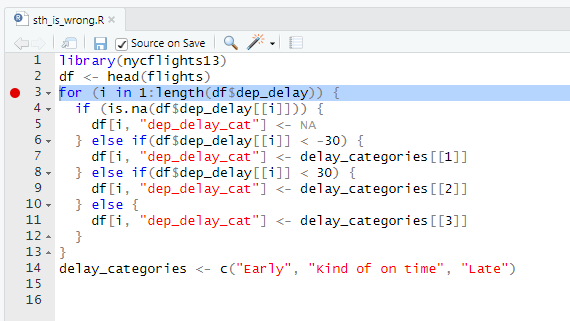
There is some code to reproduce…

sth_is_wrong.R
library(nycflights13)
df <- head(flights)
for (i in 1:length(df$dep_delay)) {
  if (is.na(df$dep_delay[[i]])) {
    df[i, "dep_delay_cat"] <- NA
  } else if(df$dep_delay[[i]] < -30) {
    df[i, "dep_delay_cat"] <- delay_categories[[1]]
  } else if(df$dep_delay[[i]] < 30) {
    df[i, "dep_delay_cat"] <- delay_categories[[2]]
  } else {
    df[i, "dep_delay_cat"] <- delay_categories[[3]]
  }
}
delay_categories <- c("Early", "Kind of on time", "Late")

{reprex}: Minimal reproducible examples

In the console (or with the RStudio add-on):

library(reprex)
reprex(here("R", "sth_is_wrong.R"))

sth_is_wrong_reprex.md is created

library(nycflights13)
df <- head(flights)
for (i in 1:length(df$dep_delay)) {
  if (is.na(df$dep_delay[[i]])) {
    df[i, "dep_delay_cat"] <- NA
  } else if(df$dep_delay[[i]] < -30) {
    df[i, "dep_delay_cat"] <- delay_categories[[1]]
  } else if(df$dep_delay[[i]] < 30) {
    df[i, "dep_delay_cat"] <- delay_categories[[2]]
  } else {
    df[i, "dep_delay_cat"] <- delay_categories[[3]]
  }
}
#> Error in eval(expr, envir, enclos): object 'delay_categories' not found
delay_categories <- c("Early", "Kind of on time", "Late")

Created on 2025-11-10 with reprex v2.1.0

Interactive debugging

  • browser()
  • Breakpoints

Tips for R scripts

Exercise

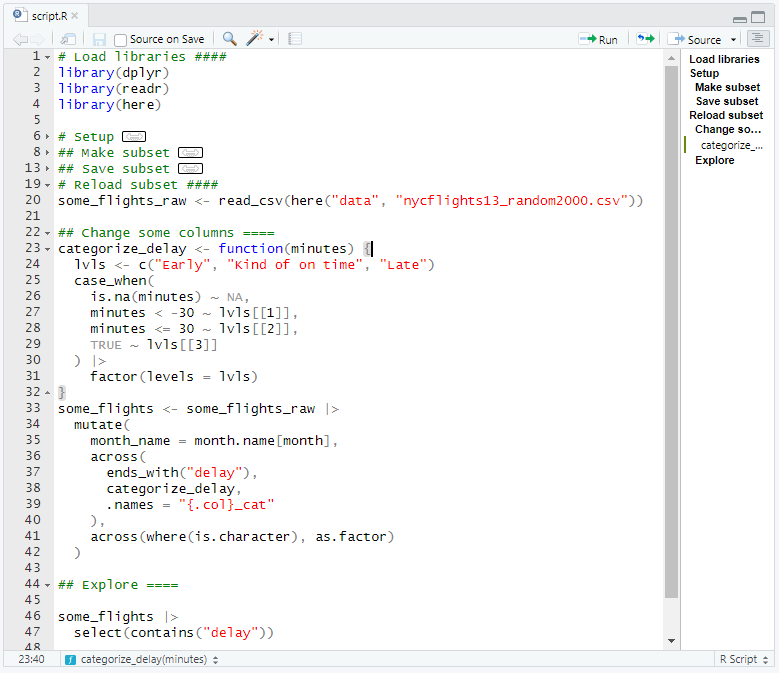
  • Run the code in “script.R” and fix the bugs necessary for it to run well. Restart R every time you source the file.
  • Add some comments with hierarchies.
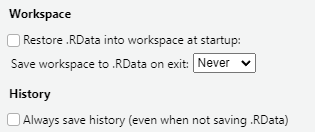
  • (Optional) Update the settings in R Studio as recommended in the previous slide.

Style

  • Naming
  • Spaces and punctuation
  • Pipe

Example

df<-read.csv( "Flight Subset 2013.csv")
df$month_name = month.name[df$month]

Naming: Best practices

  1. Beware of / avoid using existing names (e.g. df, c, T, mean)
  2. Avoid using dots (although Base R does use them)
  3. For files: stick to numbers, lowercase letters, _ and - - beware of case!
  4. For variables: use lowercase letters, numbers and snake_case.
  5. Generally: variables = nouns; functions = verbs

Improved example

library(here)
i_am("index.qmd")

some_flights<-read.csv(here( 'data' , "nycflights13_random2000.csv"))
some_flights$month_name = month.name[some_flights$month]

Spaces and punctuation

No spaces

Apandacomesintoabar

With spaces

A panda comes into a bar

No commas

…eats shoots and leaves.

With commas

…eats, shoots, and leaves.

Example

library(here)
i_am("index.qmd")

some_flights<-read.csv(here( 'data' , "nycflights13_random2000.csv"))
some_flights$month_name=month.name[some_flights$month]
for(i in 1 : length(some_flights$dep_delay)){
if(abs(i)>30){print (some_flights $ dep_delay [ i ])}
}

Best practices

  • No spaces between () and text inside.
  • Use "" instead of '' unless there is already "" inside.
  • The assignment operator in R is <-. 1
  • The assignment operator and infix operators should be surrounded by spaces.
  • Spaces around the () for for, if and when.
  • No spaces around :, $, [, ^, +
  • Spaces only after () for function arguments.
  • Difference between [] and [[]].
  • Pay attention to indentation!

Improved example

some_flights<-read.csv(here( 'data' , "nycflights13_random2000.csv"))
some_flights$month_name=month.name[some_flights$month]
for(i in 1 : length(some_flights$dep_delay)){
if(abs(i)>30){print (some_flights $ dep_delay [ i ])}
}

Improved example

some_flights <- read.csv(here("data", "nycflights13_random2000.csv"))
some_flights$month_name=month.name[some_flights$month]
for(i in 1 : length(some_flights$dep_delay)){
if(abs(i)>30){print (some_flights $ dep_delay [ i ])}
}

Improved example

some_flights <- read.csv(here("data", "nycflights13_random2000.csv"))
some_flights$month_name <- month.name[some_flights$month]
for(i in 1 : length(some_flights$dep_delay)){
if(abs(i)>30){print (some_flights $ dep_delay [ i ])}
}

Improved example

some_flights <- read.csv(here("data", "nycflights13_random2000.csv"))
some_flights$month_name <- month.name[some_flights$month]
for (i in 1:length(some_flights$dep_delay)){
if(abs(i)>30){print (some_flights $ dep_delay [ i ])}
}

Improved example

some_flights <- read.csv(here("data", "nycflights13_random2000.csv"))
some_flights$month_name <- month.name[some_flights$month]
for (i in seq_along(some_flights$dep_delay)){
if(abs(i)>30){print (some_flights $ dep_delay [ i ])}
}

Improved example

some_flights <- read.csv(here("data", "nycflights13_random2000.csv"))
some_flights$month_name <- month.name[some_flights$month]
for (i in seq_along(some_flights$dep_delay)){
  if (abs(i) > 30) {
    print (some_flights $ dep_delay [ i ])
  }
}

Improved example

some_flights <- read.csv(here("data", "nycflights13_random2000.csv"))
some_flights$month_name <- month.name[some_flights$month]
for (i in seq_along(some_flights$dep_delay)){
  if (abs(i) > 30) {
    print(some_flights$dep_delay[i])
  }
}

Exercise

  • In the script, change the name of the dataframe to something more informative.

  • Fix the spaces and the punctuation.

Tip

You may use Ctrl/⌘+F in R Studio to replace all the calls: How many times has the dataframe been called?

Use the automatic linting of R Studio to fix indentation!

Pipe

some_flights <- read.csv(here("data", "nycflights13_random2000.csv"))
some_flights$month_name <- month.name[some_flights$month]
some_flights$carrier <- as.factor(some_flights$carrier)
some_flights$tailnum <- as.factor(some_flights$tailnum)
some_flights$origin <- as.factor(some_flights$origin)

for (i in seq_along(some_flights$dep_delay)) {
  if (is.na(some_flights$dep_delay[[i]])) {
    some_flights[i, "dep_delay_cat"] <- NA
  } else if (some_flights$dep_delay[[i]] < -30) {
    some_flights[i, "dep_delay_cat"] <- "Early"
  } else if (some_flights$dep_delay[[i]] < 30){
    some_flights[i, "dep_delay_cat"] <- "Kind of on time"
  } else {
    some_flights[i, "dep_delay_cat"] <- "Late"
  }
}

some_flights$dep_delay_cat <- as.factor(some_flights$dep_delay_cat)

some_columns <- c("month_name", "carrier", "tailnum", "origin", "dep_delay_cat")
some_flights_partial <- some_flights[some_columns]

Problems

  • The same variable is overwritten: how to keep track of its state in an interactive session?

  • Typing the same thing over and over

    • risk of typos
    • what if you rename the variable?
  • Copying parts in other variables: what about memory?!

Approach

Use the pipe!

  • {magrittr}’s %>% or R’s |>

Keyboard shortcuts: Ctrl+Shitf+M / ⇧+⌘+M

(We’ll see it in action in the next section)

Data wrangling

  • Manipulating several columns at once
  • Vectorization
  • Turning quantitative values into categories

Multiple columns at once

library(dplyr)
library(readr)
some_flights_raw <- read_csv(here("data", "nycflights13_random2000.csv"))
some_flights <- some_flights_raw |>
  mutate(across(where(is.character), as.factor))
some_flights |> select(where(is.factor))
1
Specific state to which you might want to return
2
New variable for a new state
3
Apply the same transformation to multiple columns
4
Inspect a subset of columns based on a condition.
# A tibble: 2,000 × 4
   carrier tailnum origin dest 
   <fct>   <fct>   <fct>  <fct>
 1 UA      N75436  EWR    LAS  
 2 VX      N626VA  JFK    LAX  
 3 DL      N3739P  LGA    PBI  
 4 UA      N75436  EWR    MCO  
 5 B6      N630JB  JFK    FLL  
 6 EV      N18101  EWR    RDU  
 7 UA      N807UA  EWR    PDX  
 8 EV      N16149  EWR    MCI  
 9 WN      N936WN  EWR    BNA  
10 FL      N969AT  LGA    ATL  
# ℹ 1,990 more rows

Match vectors with indices

month.name
 [1] "January"   "February"  "March"     "April"     "May"       "June"     
 [7] "July"      "August"    "September" "October"   "November"  "December" 
month.name[[3]]
[1] "March"
month.name[c(4, 6, 7)]
[1] "April" "June"  "July" 
head(some_flights$month)
[1] 4 2 8 7 9 1
month.name[head(some_flights$month)]
[1] "April"     "February"  "August"    "July"      "September" "January"  

Match vectors with indices

some_flights |>
  mutate(month_name = month.name[month]) |> 
  select(month_name, month)
# A tibble: 2,000 × 2
   month_name month
   <chr>      <dbl>
 1 April          4
 2 February       2
 3 August         8
 4 July           7
 5 September      9
 6 January        1
 7 August         8
 8 December      12
 9 July           7
10 July           7
# ℹ 1,990 more rows

Turn numeric into categorical: case_when()

for (i in seq_along(some_flights$dep_delay)) {
  if (is.na(some_flights$dep_delay[[i]])) {
    some_flights[i, "dep_delay_cat"] <- NA
  } else if (some_flights$dep_delay[[i]] < -30) {
    some_flights[i, "dep_delay_cat"] <- "Early"
  } else if (some_flights$dep_delay[[i]] < 30) {
    some_flights[i, "dep_delay_cat"] <- "Kind of on time"
  } else {
    some_flights[i, "dep_delay_cat"] <- "Late"
  }
}

if_else()

some_flights |> 
  mutate(dep_delay_cat = if_else(is.na(dep_delay), NA, "We have a value")) |> 
  slice_sample(n = 5, by = dep_delay_cat) |> 
  select(starts_with("dep_delay"))
# A tibble: 10 × 2
   dep_delay dep_delay_cat  
       <dbl> <chr>          
 1        -3 We have a value
 2        -2 We have a value
 3         4 We have a value
 4        -5 We have a value
 5        11 We have a value
 6        NA <NA>           
 7        NA <NA>           
 8        NA <NA>           
 9        NA <NA>           
10        NA <NA>           

case_when()

some_flights |> 
  mutate(dep_delay_cat = case_when(
    # condition ~ output
  ))

case_when()

some_flights |> 
  mutate(dep_delay_cat = case_when(
    # condition ~ output
    is.na(dep_delay) ~ NA, # if it is NA, return NA
    TRUE ~ "Late" # else, return "Late"
  ))

case_when()

some_flights |> 
  mutate(dep_delay_cat = case_when(
    # condition ~ output
    is.na(dep_delay) ~ NA, # if it is NA, return NA
    dep_delay < -30 ~ "Early", # else if it is lower than -30 return "Early"
    dep_delay < 30 ~ "Kind of on time", # else if it is lower than 30...
    TRUE ~ "Late" # else, return "Late"
  ))

case_when() vs for loop

some_flights |> 
  mutate(dep_delay_cat = case_when(
    is.na(dep_delay) ~ NA,
    dep_delay < -30 ~ "Early",
    dep_delay < 30 ~ "Kind of on time",
    TRUE ~ "Late"
  ))
for (i in seq_along(some_flights$dep_delay)) {
  if (is.na(some_flights$dep_delay[[i]])) {
    some_flights[i, "dep_delay_cat"] <- NA
  } else if (some_flights$dep_delay[[i]] < -30) {
    some_flights[i, "dep_delay_cat"] <- "Early"
  } else if (some_flights$dep_delay[[i]] < 30) {
    some_flights[i, "dep_delay_cat"] <- "Kind of on time"
  } else {
    some_flights[i, "dep_delay_cat"] <- "Late"
  }
}

Improved example

some_flights <- some_flights_raw |> 
  mutate(
    month_name = month.name[month],
    dep_delay_cat = case_when(
      is.na(dep_delay) ~ NA,
      dep_delay < -30 ~ "Early",
      dep_delay < 30 ~ "Kind of on time",
      TRUE ~ "Late"
      ),
    across(where(is.character), as.factor)
  )
some_flights |> 
  select(month, month_name, dep_delay, dep_delay_cat)
1
Create a column with the names of the months based on the number
2
Make a categorical version of dep_delay.
3
Turn all character columns into factors

Improved example

# A tibble: 2,000 × 4
   month month_name dep_delay dep_delay_cat  
   <dbl> <fct>          <dbl> <fct>          
 1     4 April             61 Late           
 2     2 February          -1 Kind of on time
 3     8 August             0 Kind of on time
 4     7 July               5 Kind of on time
 5     9 September         -2 Kind of on time
 6     1 January            4 Kind of on time
 7     8 August            -7 Kind of on time
 8    12 December          14 Kind of on time
 9     7 July              12 Kind of on time
10     7 July             365 Late           
# ℹ 1,990 more rows

Multiple columns at once

some_flights |> 
  mutate(
    dep_delay_cat = case_when(
      is.na(dep_delay) ~ NA,
      dep_delay < -30 ~ "Early",
      dep_delay < 30 ~ "Kind of on time",
      TRUE ~ "Late"
    ) |> as.factor()
  )

Multiple columns at once

some_flights |> 
  mutate(
    across(ends_with("delay"),
    ~ case_when(
      is.na(.x) ~ NA,
      .x < -30 ~ "Early",
      .x < 30 ~ "Kind of on time",
      TRUE ~ "Late"
    ) |> as.factor(),
    .names = "{.col}_cat"
  )

Multiple columns at once

some_flights |> 
  mutate(
    across(ends_with("delay"),
    ~ case_when(
      is.na(.x) ~ NA,
      .x < -30 ~ "Early",
      .x < 30 ~ "Kind of on time",
      TRUE ~ "Late"
    ) |> factor(levels = c("Early", "Kind of on time", "Late")),
    .names = "{.col}_cat"
  )

Multiple columns at once

# A tibble: 2,000 × 4
   dep_delay arr_delay dep_delay_cat   arr_delay_cat  
       <dbl>     <dbl> <fct>           <fct>          
 1        61        33 Late            Late           
 2        -1       -50 Kind of on time Early          
 3         0        -6 Kind of on time Kind of on time
 4         5       -12 Kind of on time Kind of on time
 5        -2       -10 Kind of on time Kind of on time
 6         4         4 Kind of on time Kind of on time
 7        -7       -31 Kind of on time Early          
 8        14        28 Kind of on time Kind of on time
 9        12        -5 Kind of on time Kind of on time
10       365       344 Late            Late           
# ℹ 1,990 more rows

Exercise

  • Use readr::read_csv() to read the file and return a tibble.
  • Use the pipe and dplyr::mutate() to modify the character columns into factors.
  • Use dplyr::across() and dplyr::case_when() to obtain a categorical version of the delay columns.

I/O

  • {readr}
  • File formats / extensions

Comma-separated values

cat_file_name <- here("data", "flights_with_factors.csv")
some_flights |>
  select(carrier, flight, month_name, time_hour, contains("delay")) |> 
  write_csv(cat_file_name)
readLines(cat_file_name, n = 10)
 [1] "carrier,flight,month_name,time_hour,dep_delay,arr_delay,dep_delay_cat,arr_delay_cat"
 [2] "UA,1168,April,2013-04-12T22:00:00Z,61,33,Late,Late"                                 
 [3] "VX,407,February,2013-02-28T14:00:00Z,-1,-50,Kind of on time,Early"                  
 [4] "DL,1174,August,2013-08-22T15:00:00Z,0,-6,Kind of on time,Kind of on time"           
 [5] "UA,1722,July,2013-07-31T10:00:00Z,5,-12,Kind of on time,Kind of on time"            
 [6] "B6,1801,September,2013-09-11T20:00:00Z,-2,-10,Kind of on time,Kind of on time"      
 [7] "EV,4212,January,2013-01-06T20:00:00Z,4,4,Kind of on time,Kind of on time"           
 [8] "UA,671,August,2013-08-26T11:00:00Z,-7,-31,Kind of on time,Early"                    
 [9] "EV,4567,December,2013-12-23T15:00:00Z,14,28,Kind of on time,Kind of on time"        
[10] "WN,165,July,2013-07-18T17:00:00Z,12,-5,Kind of on time,Kind of on time"             

{readr}

read_csv(cat_file_name)
# A tibble: 2,000 × 8
   carrier flight month_name time_hour           dep_delay arr_delay
   <chr>    <dbl> <chr>      <dttm>                  <dbl>     <dbl>
 1 UA        1168 April      2013-04-12 22:00:00        61        33
 2 VX         407 February   2013-02-28 14:00:00        -1       -50
 3 DL        1174 August     2013-08-22 15:00:00         0        -6
 4 UA        1722 July       2013-07-31 10:00:00         5       -12
 5 B6        1801 September  2013-09-11 20:00:00        -2       -10
 6 EV        4212 January    2013-01-06 20:00:00         4         4
 7 UA         671 August     2013-08-26 11:00:00        -7       -31
 8 EV        4567 December   2013-12-23 15:00:00        14        28
 9 WN         165 July       2013-07-18 17:00:00        12        -5
10 FL         778 July       2013-07-22 22:00:00       365       344
# ℹ 1,990 more rows
# ℹ 2 more variables: dep_delay_cat <chr>, arr_delay_cat <chr>

X-separated values…

Values separated by spaces (readr::read_table())

col1 col2 col3
1.5 2.2 3
4 5 6
7 8 9

Comma separated values (readr::read_csv())

col1,col2,col3
1.5,2.2,3
4,5,6
7,8,9

Values separated by semicolons (readr::read_csv2())

col1;col2;col3
1,5;2,2;3
4;5;6
7;8;9

Tab-separated values (readr::read_tsv())

col1    col2    col3
1,5 something;semicolon 3
text,with,commas    wha a a t   6
7   8   9

.rds, .rda, .Rdata, other formats

File type Save Open Pros Cons
.rda/.Rdata1 save() load() Save multiple R objects as they are Only R can open it; modifies variables
.rds saveRDS() readRDS() Save single R object as it is Only R can open it.
.txt, .csv… write.csv() read.csv() Plain text: interoperable Not just any R object

Literate programming

  • {rmarkdown}, {bookdown}
  • Quarto
---
title: "Great code report"
author: "A responsible researcher"
---

```{r}
#| include: false
library(here)
library(readr)
my_data <- read_csv("path/to/data")
```

I will show a dataset with `r nrow(my_data)` rows.

```{r}
knitr::kable(my_data)
```

Exercise

  • Save the filtered dataset as a file with comma-separated values, in a new folder called “output”.

To finish: start over

  1. Create a new, empty project without git.
  2. Turn it into a git repository with usethis::use_git().
  3. Add a readme with usethis::use_readme_rmd().
  4. Create a script and fill it with the code in this gist.
  1. Source the script from the README.
  2. Edit the text of the README and call print_tree() from the sourced script.
  3. Render the README.
  4. Link to GitHub with usethis::use_github(protocol="ssh").

References

Online books

Blogposts

YouTube